Your project is the starting point.
The companion reads the open project and active sequence from Premiere. Switching context updates where new time belongs.
Built for the hours between cuts
The shoot is quoted. The edit is a moving target. Automatically track your team’s time in Premiere Pro and put real numbers behind the next quote.
For Adobe Premiere Pro · Mac first · Join the waitlist
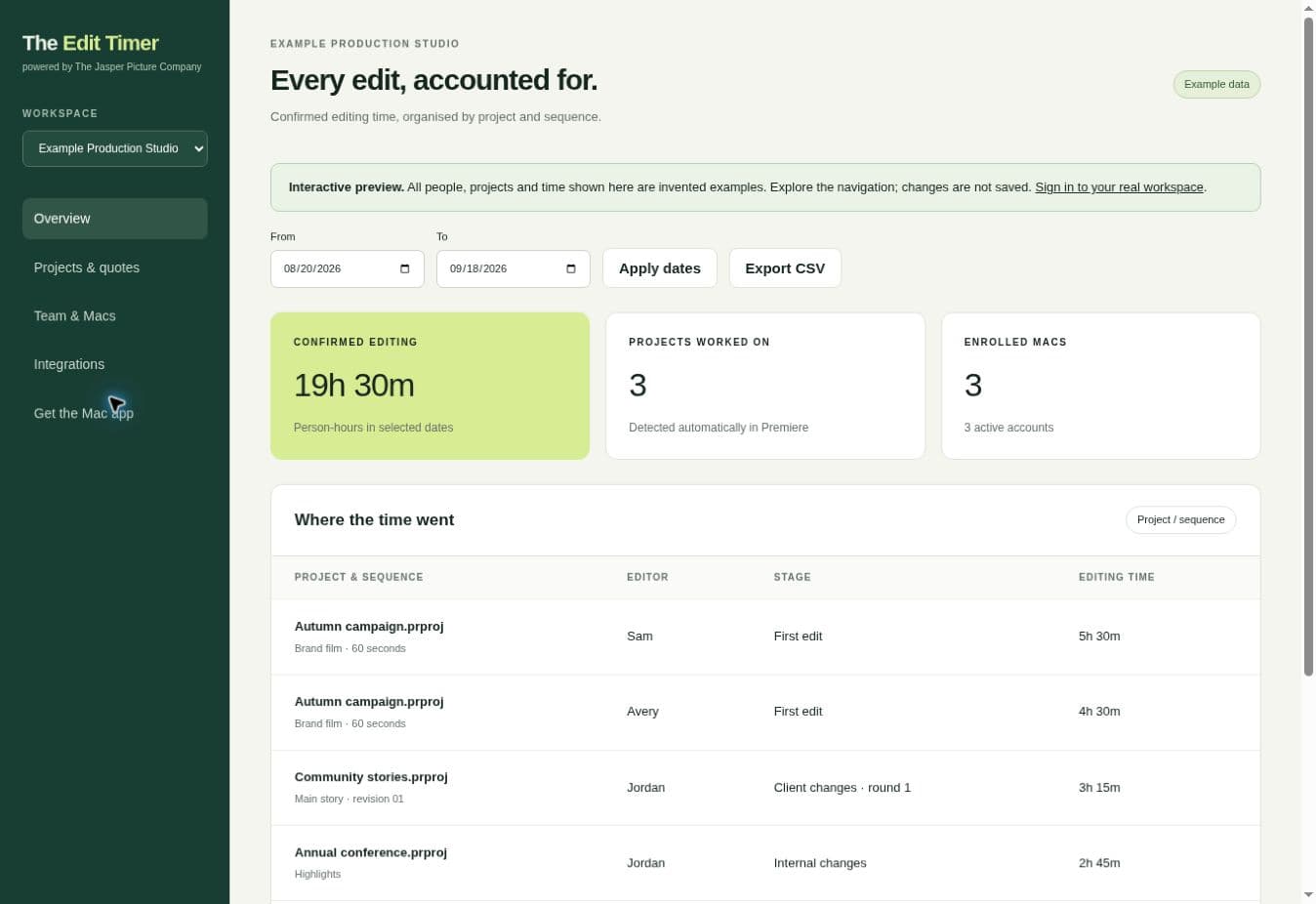
The working dashboard, shown with example people, projects and time.
A quieter way to track time
Once your Mac is connected, there is no project list to fill in and no timer to remember.
The companion reads the open project and active sequence from Premiere. Switching context updates where new time belongs.
Time is saved while Premiere is in use. Background time pauses, and long idle breaks are trimmed automatically.
Review confirmed time across editors, projects and sequences. Compare it with the hours you allowed for the job.
Built around a working edit suite
Projects are detected automatically. Time follows the active sequence, so the hero film and the social cutdowns have their own context.
Tracking pauses when Premiere goes into the background. After five minutes without input, the idle gap is removed back to the last interaction.
Bring confirmed time from enrolled Macs into one company workspace. See who worked on each project, with separate staff accounts.
Link detected projects to a job and compare hours with your editing allowance. Set revision stages explicitly to understand the cost of changes.
The Mac companion saves time locally and queues it for upload when the connection returns. Editing comes first.
Export a CSV or connect a compatible AI client through the read-only MCP interface. Direct CRM and Xero integrations are planned.
From our edit suite to yours
At The Jasper Picture Company, we know how to quote a shoot. Editing is harder: another version, another round of changes, another set of cutdowns.
We’re building The Edit Timer to make those hours visible, without adding another admin task to the editor’s day. It is being developed around the way our own production team works.
Meet The Jasper Picture CompanyWe’re starting with Adobe Premiere Pro on Mac. Tell us which version your team uses so we can keep you updated about access.
Join the waitlist for launch updates. Public trials and payments are not open yet.
A few good questions
Both. Each saved interval includes the detected project and active sequence context. If two sequence tabs are open, the active sequence gets the time once. Bin work can remain attributed to the last active timeline; this is context, not a record of every timeline action.
Premiere going into the background pauses tracking. A gap of more than five minutes without input in Premiere is removed back to the last observed interaction. Tracking resumes when you interact with Premiere again. Short gaps can count as thinking time.
The Edit Timer is being built for Adobe Premiere Pro, starting on Mac. Join the waitlist with your version details and we’ll let you know when access is ready for your setup. Our compatibility page explains which versions have been tested.
You assign revision stages to a job in the dashboard. Sequence names alone do not tell us whether an edit is a first cut, internal review or client revision, so we do not guess.
No. It records editing intervals, project names and file paths, sequence names and identifiers, and editor/device identifiers. It does not upload footage, project contents, screenshots, typed keys or mouse coordinates. See our privacy information below.
The dashboard has CSV export and a read-only MCP interface for compatible clients. Direct Xero and CRM connections are on the roadmap. Automatic timesheet posting and invoicing are not available yet.
Our planned standalone offer is a 7-day free trial, then A$29 per month. The Edit Timer will also be included at no extra cost in the A$99 per month Video Production CRM plan. Both options cover up to three editors and unlimited report-only users. Australian pricing includes GST. Public trials and payments are not open yet. Joining the waitlist does not start a trial or require payment.
Make the hours useful
Track editing hours by Premiere Pro project and active sequence. Learn how automatic timing, five-minute idle breaks and team reporting work in The Edit Timer.
Read the guideUnderstand how editing time is attributed to active Premiere Pro sequences, including multiple open timelines, cutdowns, bin work and revision stages.
Read the guideEstimate video editing time from footage, story, graphics, formats and revision rounds. Use an example editing allowance and actual hours to improve your next quote.
Read the guideBe part of what comes next
Join the waitlist for The Edit Timer. Tell us what you edit on, and we’ll be in touch when early access is ready.
No payment. No automatic trial. Just a place on the list.